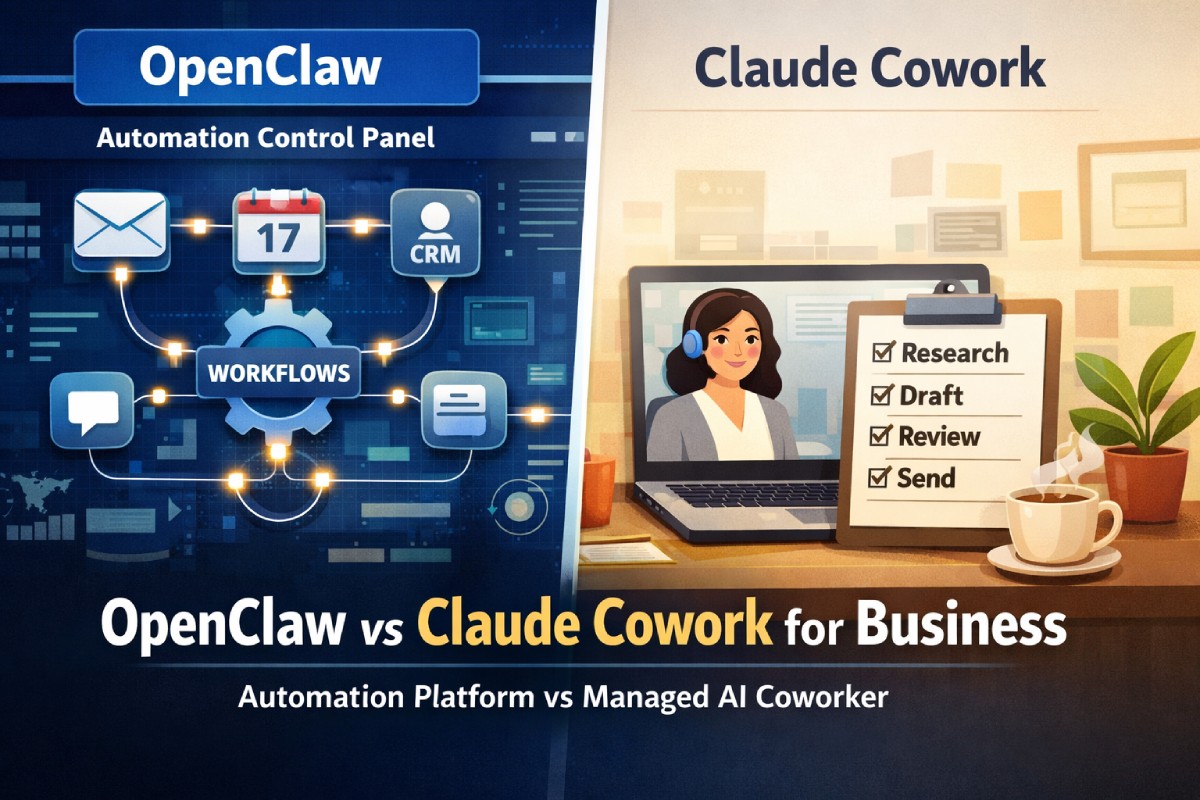

OpenClaw vs Claude Cowork for business is no longer a “which chatbot is smarter?” question. It’s a workflow architecture decision: Do you want an open, always-on agent framework you can wire into anything (OpenClaw), or a managed, desktop-first AI coworker designed for controlled knowledge work (Claude Cowork)?
Both can summarize docs, draft emails, and generate plans. The real difference shows up when you scale to teams: permissions, audit trails, reliability, connector risk, human approvals, cost predictability, and how much IT/security you’re willing to own. This guide breaks down the differences that actually matter in business settings—then gives you a decision checklist, a practical rollout plan, and a governance model you can copy.
OpenClaw is best described as an agent platform: you assemble skills/tools, connect accounts, and let it run workflows across apps—often with “always-on” automation patterns.
Claude Cowork is best described as a managed AI coworker: a guided, desktop-centric agent experience that executes multi-step tasks with clearer guardrails and enterprise-friendly controls.
1. Core philosophy: “platform” vs “product”
1.1 OpenClaw: build-your-own agent operations
OpenClaw tends to shine when your business wants automation that feels like a mini-operations layer: inbox triage, meeting scheduling, customer updates, back-office workflows, and chat-driven actions across messaging platforms.
That flexibility is also the tax. In most organizations, “flexibility” means:
- More decisions about permissions and boundaries
- More testing before letting it touch real customer data
- More maintenance around connectors, skills, and versioning
OpenClaw is a strong fit if you already have some combination of:
- Technical ops (DevOps/IT) support
- A willingness to create “golden paths” for workflows
- A need for custom automation across multiple systems
1.2 Claude Cowork: guided execution for knowledge work
Claude Cowork is the opposite bet: “Most teams don’t want to build an agent platform. They want a safe coworker that does work.”
In practice, Claude Cowork is often best for:
- Research synthesis with citations to internal sources (your own docs)
- Drafting deliverables (briefs, decks, emails, SOPs)
- Organizing files and producing structured outputs
- Browser-based tasks with more deliberate steps
The tradeoff is that you’re choosing a more “productized” experience:
- Less tinkering
- Fewer weird edge-case automations
- More consistent governance patterns out of the box
2. Best-fit business use cases by department
2.1 Sales & RevOps
OpenClaw wins when:
- You want auto-routing inbound leads (rules + agent actions)
- You want multi-step follow-ups across email + CRM + calendar
- You need “after-hours” workflows that run without someone logged in
Claude Cowork wins when:
- Reps need better account research and talk tracks
- You need clean first-draft outreach emails + call recap summaries
- You want consistent outputs without lots of configuration
Reality check: If you run strict compliance (regulated industries), Claude Cowork is usually easier to standardize. If you run high-velocity outbound, OpenClaw’s automation style can be a superpower—if you govern it.
2.2 Customer support & CX
OpenClaw wins when:
- You want automation that watches queues and triggers actions
- You want to stitch together helpdesk + billing + Slack workflows
- You need continuous workflows (escalations, tagging, routing)
Claude Cowork wins when:
- Agents need a “copilot-like” coworker for drafting responses
- You want consistent tone and templates
- You want easy onboarding for non-technical teams
2.3 Marketing & content
OpenClaw wins when:
- You want workflows that publish, schedule, repurpose, and distribute
- You want to connect a bigger toolchain (CMS, social, analytics, email)
- You want always-on monitoring (competitor mentions, alerts, briefs)
Claude Cowork wins when:
- You want better creative briefs, campaign plans, and QA checklists
- You need fast synthesis from a pile of documents and notes
- You want structured drafts without maintaining integrations
2.4 Finance & ops
OpenClaw wins when:
- You want automation that moves data between systems
- You want scheduled tasks (reconciliations, reminders, approvals)
- You can isolate it in a safe environment
Claude Cowork wins when:
- You mostly need analysis summaries, policy drafts, and planning docs
- You want repeatable deliverable generation with lower integration risk
3. Automation model: “always-on agents” vs “task sessions”
3.1 OpenClaw’s always-on advantage (and risk)
OpenClaw typically supports a more continuous model: it can be “listening” to events (messages, triggers, schedules) and executing workflows repeatedly.
That’s valuable for:
- Daily/weekly reporting loops
- After-hours workflows
- Routine operations work
It’s also the most common source of business mistakes:
- An agent takes action on ambiguous context
- A skill behaves differently after an update
- An automation loops or spams stakeholders
- A prompt injection or malicious input tricks the agent
If you pick OpenClaw, assume you’ll need a “production mindset”:
- Human approval gates for risky actions
- Strict scopes per connector
- Monitoring and kill-switches
- Logs you can actually review
3.2 Claude Cowork’s session-based predictability
Claude Cowork tends to work more like a guided job: start a task, let it work, review outputs, then finalize actions.
That makes it easier to:
- Train teams quickly
- Maintain consistent quality
- Add approval steps by default
If your goal is “reduce time-to-first-draft and increase consistency,” Claude Cowork will usually feel calmer to run at scale.
4. Integrations & connectors: breadth vs control
4.1 OpenClaw’s ecosystem and extensibility
OpenClaw typically thrives with:
- Broad connector options
- Community and custom “skills”
- The ability to wire into niche internal tools
This is ideal when your stack isn’t “standard SaaS only.” If you have bespoke tools, old internal systems, or multi-tenant client workflows, the flexibility matters.
But connector breadth introduces governance needs:
- Who can install skills?
- How are skills reviewed?
- How do you handle permissions drift over time?
- How do you limit “shadow automations” created by well-meaning teams?
4.2 Claude Cowork’s curated connectors
Claude Cowork generally leans toward:
- More curated integration paths
- More predictable permission prompts
- A tighter model around “what it can do”
That reduces surprise. It can also limit power users who want deep customization.
5. Security & governance: what your risk team will ask
5.1 Permissioning model
A practical way to compare them is:
- OpenClaw: “You can connect almost anything—so you must scope it carefully.”
- Claude Cowork: “You grant access intentionally, with a more guided experience.”
In both cases, your enterprise questions will be similar:
- Can we restrict what data it can access?
- Can we restrict what actions it can take?
- Can we isolate environments (dev vs prod)?
- Can we enforce human-in-the-loop for sensitive operations?
5.2 Prompt injection and “untrusted content”
If either system can read emails, websites, tickets, docs, or messages, it can be exposed to untrusted text. That’s where prompt injection happens: malicious instructions embedded in content try to override your intended rules.
Business mitigation playbook (works for both):
- Treat external content as untrusted by default
- Require confirmations for actions that send, delete, approve, purchase, or publish
- Use allowlists for domains, recipients, and actions
- Separate “read” privileges from “write” privileges wherever possible
5.3 Auditability
In business, the winner is often whichever tool gives you:
- Clear logs of what was accessed
- Clear records of actions taken
- Easy-to-explain permissions
If you can’t answer “what happened and why?” you’ll struggle in incident response.
6. Reliability & operations: who owns the mess at 2 a.m.?
6.1 OpenClaw tends to need an owner
When OpenClaw is operating like an automation layer, you need someone accountable for:
- Workflow health checks
- Skill updates and compatibility
- Credential rotation
- Fail-safe behavior
- Incident response procedures
If your organization already runs automation (Zapier/Make, scripts, RPA, internal bots), this is familiar. If not, it’s a culture change.
6.2 Claude Cowork tends to reduce operational overhead
Claude Cowork is usually easier to:
- Roll out with fewer moving parts
- Train users on “safe patterns”
- Keep consistent outputs
You still need governance, but you’re less likely to be debugging complex automations.
7. Cost & ROI: predictable subscription vs variable usage risk
7.1 What businesses actually care about
Forget “price per seat” for a moment. Businesses care about:
- Cost predictability
- Cost per saved hour (and where those hours land)
- Failure cost (brand damage, compliance incidents, customer impact)
7.2 A simple ROI framing
Use this to compare both tools in the same language:
ROI = (Hours saved × Fully loaded hourly cost × Adoption rate) − (Tool cost + Admin cost + Risk cost)
Where:
- Tool cost = subscription and/or usage
- Admin cost = governance + automation maintenance
- Risk cost = expected impact of errors (mitigated by approvals and scopes)
Claude Cowork often wins when admin cost and risk cost must stay low.
OpenClaw often wins when automation scale is large enough that saved hours dwarf admin cost.
8. Side-by-side comparison table
| Category | OpenClaw | Claude Cowork | Best choice if you… |
|---|---|---|---|
| Primary role | Agent platform / automation layer | Managed AI coworker for tasks | Want automation vs want guided execution |
| Automation style | Always-on, event-driven possible | Task/session-driven | Need after-hours workflows vs need predictable runs |
| Customization | High (skills, connectors, workflows) | Moderate (more curated) | Have unique workflows vs want standardization |
| Governance burden | Higher (you own more) | Lower (product guardrails) | Have ops maturity vs want low overhead |
| Security posture | Depends heavily on your setup | Generally easier to govern | Have security engineering vs want faster approvals |
| Best for | Ops-heavy teams, cross-tool automations | Knowledge work deliverables | Need actions across systems vs need high-quality drafts |
| Failure modes | Automation mistakes, skill issues | Over-reliance, missed nuance | Can monitor automations vs want controlled tasks |
| Rollout speed | Medium–slow (design needed) | Fast (train + deploy) | Can invest in setup vs need quick time-to-value |
9. How to choose: a practical decision framework
9.1 Pick OpenClaw if these are true
- You need real automation, not just drafting and summarizing
- You want always-on workflows (alerts, routing, follow-ups)
- Your stack is complex and you need custom connectors
- You can staff or assign an owner for:
- Permissions
- Workflow QA
- Logging and incident response
9.2 Pick Claude Cowork if these are true
- You want fast adoption across non-technical teams
- You want consistent deliverables (docs, summaries, plans)
- You need clear governance without building a mini platform
- You want to minimize the chance of “agent went rogue” incidents
9.3 Choose both if your org is big enough
Many businesses land on a hybrid:
- Claude Cowork for broad team productivity (knowledge work)
- OpenClaw for a smaller “automation guild” (RevOps, Support Ops, IT)
This reduces risk while still capturing the automation upside.
10. Implementation blueprint (copy/paste for rollout)
10.1 Week 1: pick 3 workflows and define “done”
Choose workflows that are:
- Frequent (daily/weekly)
- Painful (lots of context switching)
- Low-risk at first (no irreversible actions)
Examples:
- Daily brief + meeting prep
- Support ticket summarization + suggested replies
- Lead research + outreach draft package
Define success as:
- ≥30% time saved on that workflow
- ≤5% “rework” rate
- Clear approvals for anything that sends/publishes
10.2 Week 2: create guardrails
Non-negotiables:
- Least-privilege access (only needed folders/apps)
- Human approval for:
- Sending email/messages
- Publishing content
- Deleting/closing tickets
- Making purchases/commitments
- Standard templates (tone, compliance, brand)
10.3 Week 3–4: scale with a governance model
Create:
- A small admin group (IT + security + one business owner)
- A request process for new connectors/skills
- A change log process (“what changed, when, why”)
- A kill-switch plan (how to disable quickly)
11. Common mistakes to avoid
11.1 Letting “power users” install anything
If you go OpenClaw-heavy, treat skills like browser extensions in a regulated company: review them, restrict them, and keep an allowlist.
11.2 Giving write access too early
Start with read-only or “suggest-only.” Add write access only after:
- You can measure accuracy
- You’ve defined approval rules
- You’ve trained users on what “good” looks like
11.3 Measuring only “cool demos”
Measure:
- Time saved
- Error rate
- Adoption rate
- Escalations/incidents
- Business outcomes (pipeline velocity, ticket resolution time, cycle time)
FAQ
1) Is OpenClaw or Claude Cowork better for small businesses?
Small businesses usually benefit more from Claude Cowork if they want fast, low-maintenance productivity gains—especially for writing, planning, and research. OpenClaw can be incredible for small teams when one person can own automations end-to-end, but it’s easier to misconfigure. If you don’t have time to manage skills, permissions, and workflows, start with Claude Cowork.
2) Which is safer for regulated industries?
Claude Cowork is often easier to standardize because it’s more productized and tends to encourage deliberate task execution. That said, safety depends on how you configure access and approvals. With strong governance—least privilege, logging, and human approvals—OpenClaw can be used safely too, but the operational burden is higher.
3) Can OpenClaw replace workflow tools like Zapier or Make?
It can overlap, especially for multi-step automations that require “reasoning” and flexible decision-making. But most businesses still keep deterministic automation tools for critical processes because they’re easier to test and audit. A common approach is: use OpenClaw for the messy middle (interpretation, drafting, routing decisions) and keep core system changes in deterministic automations.
4) Can Claude Cowork run always-on automations?
Claude Cowork is generally better suited for session-based, user-initiated tasks rather than continuously running automations. If your business needs 24/7 event-driven workflows, OpenClaw’s model is usually a better match. If you just need consistent multi-step work completion with review points, Claude Cowork fits well.
5) What’s the biggest hidden cost in both tools?
Governance. Even if pricing looks great, your real cost includes permissions design, user training, prompt standards, quality checks, and incident response. Claude Cowork typically reduces governance complexity for broad rollouts. OpenClaw can return higher productivity if automation volume is large—but only if you invest in guardrails and ownership.
6) How do we pilot without risking customer-facing mistakes?
Run a pilot in “suggest-only” mode. Let the tool draft, summarize, classify, and recommend actions—but require a human to approve sending, publishing, deleting, or closing. Start with internal workflows (meeting prep, reporting, research) before external-facing workflows (customer replies, outbound campaigns). Track accuracy, rework, and time saved weekly.
FAQ schema (JSON-LD)
{
  "@context": "https://schema.org",
  "@type": "FAQPage",
  "mainEntity": [
    {
      "@type": "Question",
      "name": "Is OpenClaw or Claude Cowork better for small businesses?",
      "acceptedAnswer": {
        "@type": "Answer",
        "text": "Small businesses usually benefit more from Claude Cowork for fast, low-maintenance productivity gains in writing, planning, and research. OpenClaw can be excellent if someone can own automations, but it requires more setup and governance."
      }
    },
    {
      "@type": "Question",
      "name": "Which is safer for regulated industries?",
      "acceptedAnswer": {
        "@type": "Answer",
        "text": "Claude Cowork is often easier to standardize for regulated environments because it is more productized and encourages deliberate execution. OpenClaw can be used safely with strict least-privilege access, logging, and human approvals, but typically has higher governance overhead."
      }
    },
    {
      "@type": "Question",
      "name": "Can OpenClaw replace workflow tools like Zapier or Make?",
      "acceptedAnswer": {
        "@type": "Answer",
        "text": "OpenClaw can overlap with workflow tools for multi-step automations requiring reasoning, but many businesses keep deterministic automation tools for critical, auditable processes. A common pattern is using OpenClaw for interpretation and drafting while keeping core system changes in deterministic tools."
      }
    },
    {
      "@type": "Question",
      "name": "Can Claude Cowork run always-on automations?",
      "acceptedAnswer": {
        "@type": "Answer",
        "text": "Claude Cowork is generally best for session-based tasks rather than continuous, event-driven automation. If you need always-on workflows, OpenClaw is typically a better fit. If you need multi-step task completion with review points, Claude Cowork is usually ideal."
      }
    },
    {
      "@type": "Question",
      "name": "What’s the biggest hidden cost in both tools?",
      "acceptedAnswer": {
        "@type": "Answer",
        "text": "Governance is the biggest hidden cost: permissions design, training, standards, quality checks, and incident response. Claude Cowork often reduces governance complexity for broad rollouts. OpenClaw can yield higher returns at scale if you invest in guardrails and clear ownership."
      }
    },
    {
      "@type": "Question",
      "name": "How do we pilot without risking customer-facing mistakes?",
      "acceptedAnswer": {
        "@type": "Answer",
        "text": "Pilot in suggest-only mode: let the system draft and recommend, but require human approval for sending, publishing, deleting, or closing. Start with internal workflows first, measure accuracy and rework, then expand to customer-facing workflows once guardrails are proven."
      }
    }
  ]
}
Conclusion
OpenClaw vs Claude Cowork for business comes down to a single question: Are you buying an automation platform or a managed coworker? If your competitive advantage depends on stitching tools together into reliable, always-on workflows—and you can govern it—OpenClaw can unlock massive leverage. If you want fast adoption, predictable multi-step execution, and fewer operational surprises, Claude Cowork is usually the safer path to broad productivity gains.
If you’re unsure, run a two-track pilot: Claude Cowork for general teams and OpenClaw for a small automation squad. Measure time saved, rework, and incident rate for 30 days. The numbers will tell you which approach fits your business reality.