
n8n vs Flowise for business chatbot is a common decision point when a team wants to ship a working assistant quickly—but also needs reliability, governance, and a path to production. Both tools can help you build an LLM-powered chatbot, yet they come from different “worlds.” n8n is workflow automation and systems integration first. Flowise is LLM app-building (chains, agents, and RAG) first.
This guide is written for teams that are ready to copy a PoC plan into action. You’ll learn where each tool fits in a business chatbot stack, the tradeoffs that matter (security, scaling, maintainability, and cost), and how to choose based on your constraints. You’ll also get a practical architecture blueprint, a decision table, and a step-by-step PoC checklist you can run in days—not weeks.
1. What Each Tool Is Really Best At
1.1 n8n in one sentence: integration-first orchestration
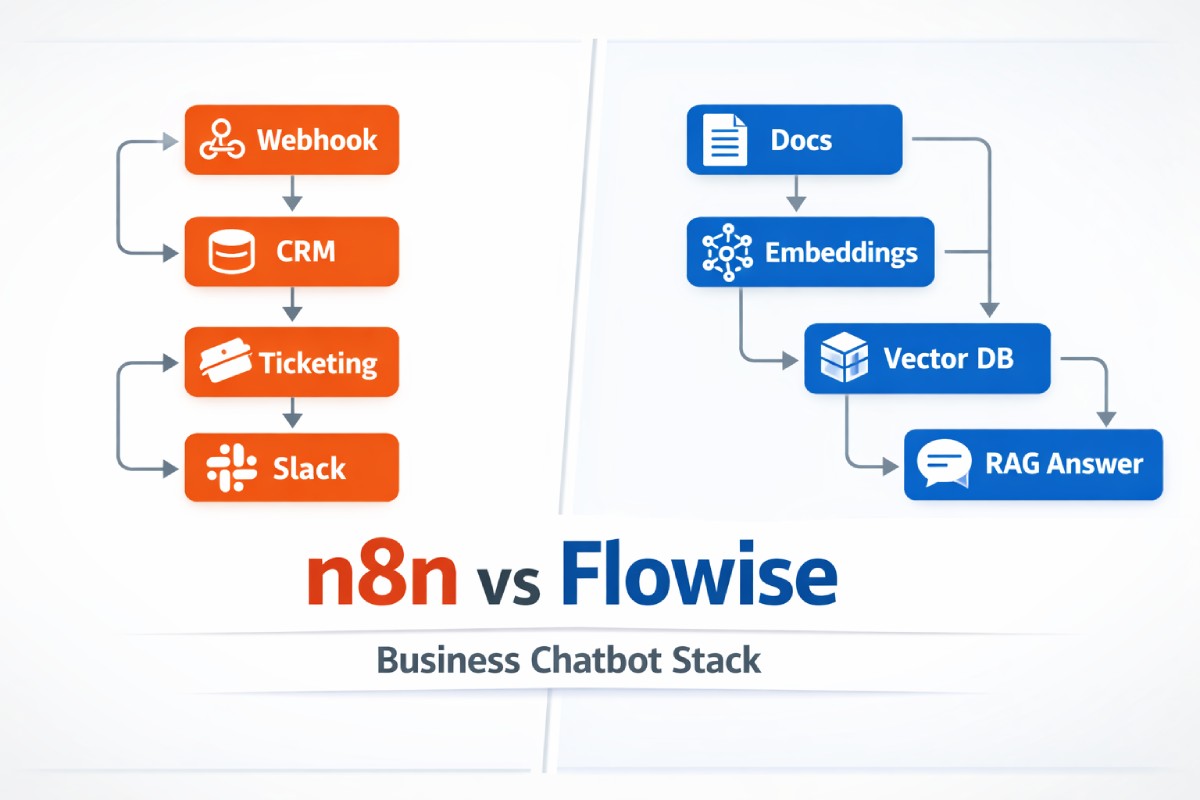
n8n shines when your chatbot must do things across business systems: create tickets, update CRM records, call internal APIs, sync data, run approvals, notify teams, and maintain a traceable automation trail. In practice, n8n becomes the “glue” between your chat channel (web widget, WhatsApp, Slack, Teams) and your backend.
Best-fit chatbot scenarios for n8n
- Support bot that files tickets, fetches order status, and triggers escalations
- Sales assistant that logs leads, schedules demos, enriches contacts
- Operations bot that runs playbooks (refunds, cancellations, access requests)
- Any chatbot that needs reliable workflows, retries, error handling, and integration coverage
1.2 Flowise in one sentence: LLM experience builder (RAG + agents)
Flowise is strongest when you’re building the LLM brain: prompt/chains, retrieval-augmented generation, tool calling patterns, memory strategies, vector search flows, and experimentation with LLM app components. If your biggest challenge is “make the bot answer correctly from our docs,” Flowise is often the shortest path.
Best-fit chatbot scenarios for Flowise
- Knowledge-base assistant with RAG over policies, manuals, SOPs
- Internal Q&A bot over wikis, PDFs, or help center content
- Rapid iteration on prompts, RAG settings, chunking, and retrieval logic
- “LLM-first” prototypes where integrations are secondary at the start
2. Architecture Options: How They Fit in a Business Chatbot Stack
2.1 Common production chatbot components
A business chatbot is rarely “one tool.” A stable stack usually includes:
- Channel UI: web widget / mobile / Slack / WhatsApp / Teams
- Gateway/API: auth, rate limits, request validation, routing
- Orchestrator: workflow engine + state + error handling
- LLM layer: prompts, tools, memory, RAG, evaluation
- Data layer: KB content store, vector DB, relational DB, logs
- Ops layer: monitoring, analytics, governance, auditing, backups
2.2 Three practical patterns
Pattern A — Flowise-only (fastest for answers):
Channel → Flowise → (vector DB + docs) → Response
Use when: you mainly need accurate Q&A and minimal business actions.
Pattern B — n8n-only (fastest for actions):
Channel → n8n → LLM API (optional) → business systems → Response
Use when: the bot’s job is automation, and “smart text” is secondary.
Pattern C — Best of both (most common for business):
Channel → n8n (router + governance + integrations) → Flowise (RAG/agent brain) → n8n (actions) → Response
Use when: you want strong RAG and reliable integrations, approvals, and auditability.
3. n8n vs Flowise: 11 Differences That Decide the Winner
3.1 Purpose and design philosophy
- n8n: built to automate business processes and integrate apps.
- Flowise: built to design LLM pipelines visually.
If your chatbot must change systems of record, n8n aligns naturally. If your chatbot must reason over knowledge, Flowise aligns naturally.
3.2 “Time to first useful chatbot”
- Flowise: often faster for a helpful KB chatbot (RAG templates + LLM building blocks).
- n8n: often faster for a chatbot that triggers actions (webhooks + connectors + workflow logic).
3.3 Connectors and real-world integrations
- n8n: typically broader and more automation-native integrations (CRMs, ticketing, email, chat tools, databases, webhooks).
- Flowise: can integrate via tools or APIs, but the center of gravity is the LLM pipeline.
If your stakeholders care about “can it create a Zendesk ticket, update HubSpot, and notify Slack,” n8n is hard to beat.
3.4 RAG depth and tuning
- Flowise: usually stronger out-of-the-box for RAG workflows: loaders, text splitters, embeddings, retrievers, memory blocks.
- n8n: can do RAG, but you’ll likely assemble more pieces manually (calls to embedding/vector DB, custom logic, etc.).
3.5 Governance, audit trails, and approvals
- n8n: workflow runs, branching, retries, and “who did what” are natural concepts in automation.
- Flowise: focuses on LLM chain behavior; governance often requires external logging/controls.
If you need approvals like “refund over $100 needs manager OK,” n8n is a straightforward fit.
3.6 Error handling and reliability under messy conditions
Business chatbots fail in boring ways: timeouts, flaky APIs, rate limits, partial data, and missing permissions.
- n8n: typically stronger at robust orchestration patterns (retries, fallbacks, error branches).
- Flowise: can handle failures, but it’s not a workflow engine first.
3.7 Scaling model and production operations
- n8n: production patterns resemble automation platforms (queues, workers, long-running jobs).
- Flowise: production resembles an app server for LLM calls + retrieval, often behind an API gateway.
If you expect spiky traffic, consider fronting either tool with an API gateway and implementing rate limits + caching.
3.8 Security posture and data control (high-level)
Both can be self-hosted, but production security depends on your setup:
- Network isolation (VPC/VNet)
- Secrets management
- Data retention/logging policy
- Role-based access and environment separation
- PII handling, redaction, and encryption
Practically:
- n8n often becomes a privileged integrator (it can touch many systems), so secrets and permissions matter more.
- Flowise often touches your knowledge and embeddings, so document access and leakage controls matter more.
3.9 Developer experience and maintainability
- Flowise: great for iterating prompts/RAG logic visually; can get messy if you treat it like a full workflow engine.
- n8n: great for deterministic business logic; can get unwieldy if you cram complex LLM experimentation into it.
A useful rule: keep “deterministic automation” in n8n, keep “LLM experimentation” in Flowise.
3.10 Observability: what happened, why, and can we debug it?
For business chatbots, you want:
- Conversation trace
- Tool calls made
- Retrieved sources (even if you don’t show citations to users)
- Latency per step
- Cost per conversation
- Failure reasons
n8n can provide run-level visibility for workflows. Flowise can provide pipeline-level visibility for LLM logic. In Pattern C, you can log both and correlate by a shared trace_id.
3.11 Total cost and lock-in risk
Costs are less about license and more about:
- LLM usage (tokens, embeddings)
- Vector DB operations
- Compute (hosting, scaling)
- Maintenance time (pipelines, connectors, monitoring)
Lock-in risk is lower if you treat either tool as replaceable and keep business logic in services/APIs you control.
4. Side-by-Side Comparison Table
| Category | n8n | Flowise | Best choice when… |
|---|---|---|---|
| Primary strength | Workflow automation + integrations | LLM pipelines + RAG + agents | Choose based on your #1 goal |
| Best “first PoC” | Action bot (tickets/CRM/ops) | Knowledge bot (docs/Q&A) | Your PoC success metric decides |
| RAG tooling | Possible, more DIY | Stronger out-of-box | Docs accuracy is the priority |
| Integrations | Typically broader | Via tools/APIs | Many systems must be updated |
| Reliability patterns | Strong orchestration | App-level patterns | You need retries/approvals |
| Governance/audit | Often easier | Usually needs add-ons | Compliance-heavy workflows |
| Prompt iteration | OK, not the focus | Excellent | Fast prompt/RAG tuning |
| Production ops | Workflow platform style | App server style | Depends on your infra team |
| Ideal role in stack | “Control plane” | “LLM brain” | Combine for best results |
5. Decision Guide: Pick in 60 Seconds
5.1 Choose Flowise if most of these are true
- The chatbot’s main value is answering from internal docs
- You want to experiment quickly with RAG settings
- Integrations are light (or can come later)
- You need a visual LLM builder for fast iteration
5.2 Choose n8n if most of these are true
- The chatbot must trigger business processes reliably
- You need approval flows, fallbacks, and error branches
- You have lots of third-party/internal systems to connect
- You care about “operations visibility” per workflow run
5.3 Choose both if you want to win long-term
- You need strong RAG and strong automation
- You want a clean separation: LLM logic vs deterministic logic
- You expect requirements to evolve (handoffs, escalations, new tools)
- You want to avoid building a fragile “everything in one graph”
6. Recommended PoC Blueprint (Ready to Copy)
6.1 Define a PoC that proves business value (not just “it talks”)
Pick one measurable business outcome:
- Reduce support tickets by X%
- Cut average handle time by Y minutes
- Increase lead capture rate by Z%
- Deflect top 20 FAQs with >80% helpful rating
6.2 PoC scope (what to include)
Include only what proves value:
- 1 channel (web chat or Slack)
- 1–2 workflows (ticket creation + status lookup)
- 1 knowledge source set (help center + 10 PDFs max)
- Human handoff (simple: “create ticket + notify agent”)
6.3 PoC architecture (clean and realistic)
Option 1: Flowise-centric PoC (KB bot)
- Ingest docs → chunk → embed → store in vector DB
- Chat request → retrieve top-k chunks → answer
- If confidence low → ask clarifying question or escalate
Option 2: n8n-centric PoC (action bot)
- Chat request → route intent (simple rules + LLM classification)
- Execute workflow (lookup, create ticket, update CRM)
- Return status + confirmation message
Option 3: Combined PoC (recommended for business)
- n8n receives message → normalizes input, attaches user context
- n8n calls Flowise for Q&A or “intent + plan”
- n8n executes approved actions (with allowlist + confirmations)
- n8n logs everything to a datastore + returns response
7. Safety, Compliance, and “Don’t Let the Bot Do That”
7.1 Use an action allowlist (non-negotiable)
For business chatbots, define:
- Allowed actions (e.g., “create ticket,” “lookup order,” “reset password request”)
- Disallowed actions (e.g., “issue refund” without approval, “change bank details”)
- Approval thresholds (refund amount, account changes, data export)
This is easier to enforce in n8n as the action gatekeeper, even if Flowise handles the language reasoning.
7.2 Add confirmation prompts for risky actions
Before executing:
- Summarize what will happen
- Show key fields (customer, amount, destination)
- Ask for explicit confirmation: “Reply YES to proceed”
7.3 PII hygiene
Business chatbot basics:
- Redact sensitive fields in logs (email, phone, IDs)
- Store minimal conversation history
- Separate “prompt/debug logs” from “audit logs”
- Add retention policy from day one
8. Performance and Cost Controls That Matter in Production
8.1 Cache common answers
For FAQs (“hours,” “reset password steps”), caching reduces:
- Latency
- Token cost
- Vector DB calls
8.2 Use tiered answering
A cost-smart pattern:
- Quick exact-match FAQ check
- If not found → RAG answer
- If still uncertain → ask clarifying question
- If still uncertain → handoff
8.3 Measure what the business cares about
Track:
- Containment rate (solved without human)
- First response time
- Resolution time
- Escalation reasons
- Cost per conversation
- User satisfaction (“Was this helpful?”)
9. Competitor Gap Analysis: What Most Articles Miss (So You Win)
Most “n8n vs Flowise” comparisons stop at features. For a business chatbot, the real differentiators are:
- Action governance: who/what is allowed to run, when, and with approvals
- Operational resilience: retries, fallbacks, dead-letter patterns, incident response
- Traceability: can you reconstruct why the bot did something for audit/compliance
- Separation of concerns: LLM reasoning changes often; business workflows must stay stable
- Migration path: PoC → pilot → production without rebuilding everything
If you design with those five in mind, your PoC won’t become a dead-end demo.
10. Implementation Checklist
10.1 Data and knowledge
- Choose source-of-truth docs (single owner per doc set)
- Define update cadence (weekly/monthly)
- Decide what not to include (confidential, volatile, regulated)
10.2 Chat experience
- Define tone + refusal rules (“I can’t access that”)
- Add “handoff to human”
- Add feedback buttons (“helpful / not helpful”)
10.3 Workflows and tools
- Build action allowlist
- Add confirmations for risky actions
- Add error branch + retry logic
- Add alerts for repeated failures
10.4 Observability
- Shared
trace_idacross all steps - Central logging store
- Dashboard: cost, latency, containment, errors
FAQ
1) Can Flowise replace n8n for a production business chatbot?
Flowise can power a production chatbot, especially for knowledge-based Q&A. But once you need robust integrations, approvals, retries, and operational workflows, you’ll often recreate workflow-engine features around it. In many business settings, Flowise is best as the “LLM brain,” while a workflow orchestrator (like n8n) handles governance and integrations.
2) Can n8n handle RAG well enough without Flowise?
Yes, n8n can support RAG by calling embedding models, querying a vector database, and assembling prompts. The tradeoff is speed of iteration and convenience. If your team expects to tweak chunking, retrieval strategies, and prompt logic frequently, Flowise can reduce friction. If RAG is stable and actions are the priority, n8n alone can be sufficient.
3) What’s the best setup for a customer support chatbot?
A common winning setup is: n8n as the control plane (routing, ticketing, escalation, approvals) plus Flowise for RAG (answering from your help center and internal SOPs). This keeps support operations stable while allowing fast iteration on answer quality. It also makes auditing easier because actions are executed in a governed workflow layer.
4) Which is easier to secure for enterprise use?
Either can be secured well when self-hosted, but the risk profile differs. n8n often holds more privileged credentials across many systems, so secrets management and permission scoping are critical. Flowise often handles documents and embeddings, so access control and leakage prevention are critical. In both cases, isolate networks, enforce auth, and minimize logged PII.
5) How do I prevent the bot from doing dangerous actions?
Use an action allowlist, require confirmation for sensitive steps, and put approval gates on high-impact operations (refunds, account changes, exports). Treat the LLM as a “suggestion engine,” not an executor. In practice, many teams route all real actions through n8n (or a backend service) where rules are deterministic and auditable.
6) What should my PoC include to get stakeholder buy-in?
Pick one measurable outcome (ticket deflection, lead capture, time savings) and build only what proves it: one channel, one knowledge source set, and one or two workflows. Add a simple handoff to humans and basic logging. Avoid building a “full assistant” in PoC—stakeholders trust metrics and reliability more than flashy breadth.
FAQ Schema Markup (JSON-LD)
{
  "@context": "https://schema.org",
  "@type": "FAQPage",
  "mainEntity": [
    {
      "@type": "Question",
      "name": "Can Flowise replace n8n for a production business chatbot?",
      "acceptedAnswer": {
        "@type": "Answer",
        "text": "Flowise can power a production chatbot, especially for knowledge-based Q&A. But once you need robust integrations, approvals, retries, and operational workflows, you’ll often recreate workflow-engine features around it. In many business settings, Flowise is best as the “LLM brain,” while a workflow orchestrator (like n8n) handles governance and integrations."
      }
    },
    {
      "@type": "Question",
      "name": "Can n8n handle RAG well enough without Flowise?",
      "acceptedAnswer": {
        "@type": "Answer",
        "text": "Yes, n8n can support RAG by calling embedding models, querying a vector database, and assembling prompts. The tradeoff is speed of iteration and convenience. If your team expects to tweak chunking, retrieval strategies, and prompt logic frequently, Flowise can reduce friction. If RAG is stable and actions are the priority, n8n alone can be sufficient."
      }
    },
    {
      "@type": "Question",
      "name": "What’s the best setup for a customer support chatbot?",
      "acceptedAnswer": {
        "@type": "Answer",
        "text": "A common winning setup is: n8n as the control plane (routing, ticketing, escalation, approvals) plus Flowise for RAG (answering from your help center and internal SOPs). This keeps support operations stable while allowing fast iteration on answer quality. It also makes auditing easier because actions are executed in a governed workflow layer."
      }
    },
    {
      "@type": "Question",
      "name": "Which is easier to secure for enterprise use?",
      "acceptedAnswer": {
        "@type": "Answer",
        "text": "Either can be secured well when self-hosted, but the risk profile differs. n8n often holds more privileged credentials across many systems, so secrets management and permission scoping are critical. Flowise often handles documents and embeddings, so access control and leakage prevention are critical. In both cases, isolate networks, enforce auth, and minimize logged PII."
      }
    },
    {
      "@type": "Question",
      "name": "How do I prevent the bot from doing dangerous actions?",
      "acceptedAnswer": {
        "@type": "Answer",
        "text": "Use an action allowlist, require confirmation for sensitive steps, and put approval gates on high-impact operations (refunds, account changes, exports). Treat the LLM as a “suggestion engine,” not an executor. Many teams route all real actions through n8n (or a backend service) where rules are deterministic and auditable."
      }
    },
    {
      "@type": "Question",
      "name": "What should my PoC include to get stakeholder buy-in?",
      "acceptedAnswer": {
        "@type": "Answer",
        "text": "Pick one measurable outcome (ticket deflection, lead capture, time savings) and build only what proves it: one channel, one knowledge source set, and one or two workflows. Add a simple handoff to humans and basic logging. Avoid building a “full assistant” in PoC—stakeholders trust metrics and reliability more than flashy breadth."
      }
    }
  ]
}
Conclusion
Choosing n8n vs Flowise for business chatbot comes down to what must be rock-solid first: actions or answers. If your chatbot is expected to run real business processes—tickets, CRM updates, approvals, escalations—n8n is usually the safer foundation. If your chatbot must deliver high-quality knowledge responses with RAG and you need to iterate quickly, Flowise often gets you to a helpful bot faster.
For most teams building a serious business chatbot, the strongest pattern is combining them: Flowise as the LLM brain and n8n as the governed orchestrator. That separation makes your PoC easier to expand into production without rebuilding everything. If you follow the PoC blueprint and governance guardrails above, you’ll ship something stakeholders can trust—and users will actually use.